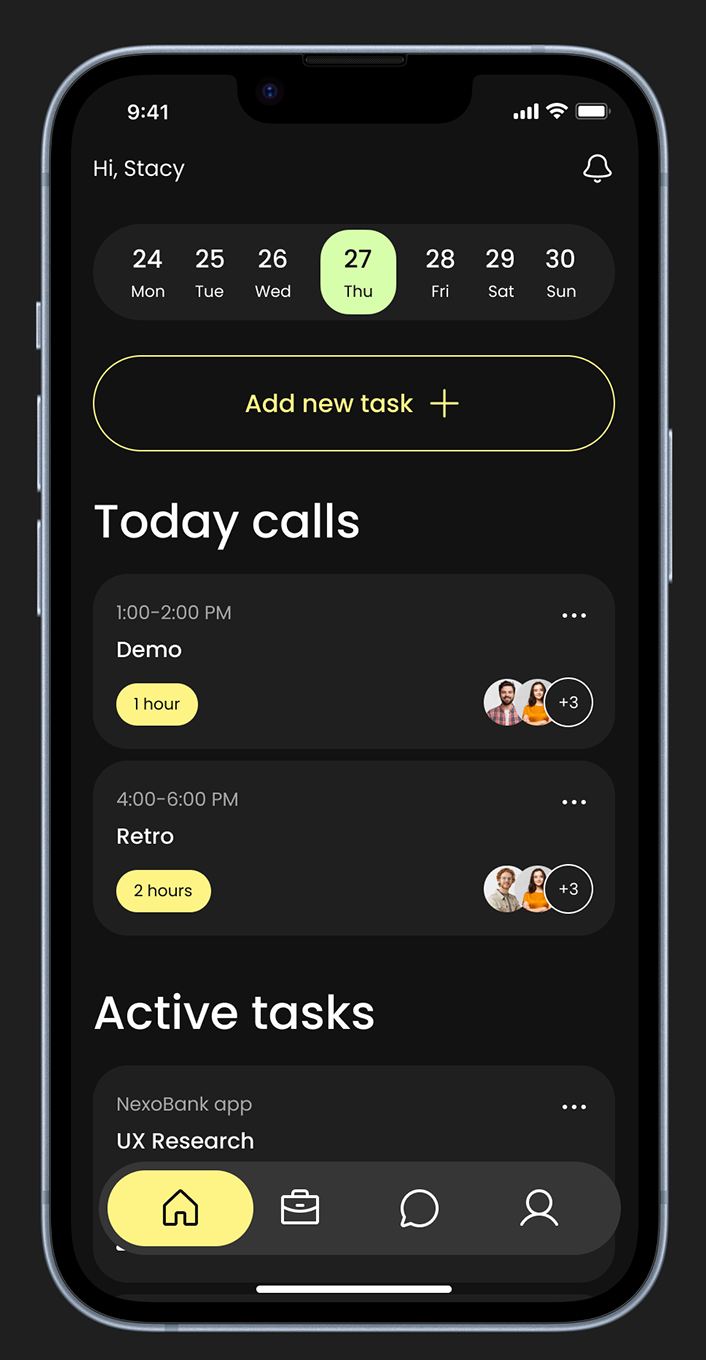
Building VRZUS: A React Native Productivity App from Zero to Launch
A technical deep-dive into building a modern cross-platform productivity app with React Native, Expo, and a startup-first mindset
- Jonas Graterol
- January 31, 2025
- 07 Mins read
- Development , Mobile , Case-study
When the VRZUS team approached us with their vision for a productivity app that would help remote teams stay organized and connected, we knew this was the kind of project we love: ambitious scope, startup constraints, and a genuine need for technical excellence.
This post is a behind-the-scenes look at how we built VRZUS from concept to launch, the technical decisions we made, and the lessons learned along the way.
The Challenge
VRZUS needed to be more than just another task management app. The founders had a clear vision:
- Cross-platform from day one: iOS and Android with a single codebase
- Beautiful, distinctive UI: Dark mode-first design that stands out in a crowded market
- Real-time collaboration: Team members needed to see updates instantly
- Buttery-smooth animations: 60fps throughout, no compromises
- Startup budget: Limited runway meant we needed to be smart about every decision
The combination of these requirements pushed us to think carefully about our technical approach.
Why React Native + Expo
After evaluating Flutter and native development, we chose React Native with Expo for VRZUS. Here’s the reasoning:
Speed to Market
For a startup, time is everything. React Native’s hot reload and Expo’s managed workflow meant our developers could iterate incredibly fast. Changes were visible in milliseconds, not minutes.
// Expo's managed workflow handles the complexity
// We focus on building features, not fighting native code
import { StatusBar } from 'expo-status-bar';
import { useColorScheme } from 'react-native';

export default function App() {
  const colorScheme = useColorScheme();
  return (
    <>
      <StatusBar style={colorScheme === 'dark' ? 'light' : 'dark'} />
      <Navigation colorScheme={colorScheme} />
    </>
  );
}
Developer Productivity
Our team had deep JavaScript/TypeScript expertise. Rather than splitting focus between Swift and Kotlin, we could have our entire mobile team working in a unified codebase with shared patterns and components.
Expo’s Ecosystem
Expo handled the pain points that traditionally slow down mobile development:
- Push notifications:
expo-notificationsjust works - Over-the-air updates: Ship bug fixes without App Store review
- Build service: No need to maintain Mac build machines
- Asset management: Images, fonts, and icons handled automatically
The Dark Mode-First Design Philosophy
VRZUS’s distinctive look comes from a deliberate design decision: dark mode isn’t an afterthought, it’s the foundation.
Color System
We built a carefully crafted color palette around VRZUS’s brand:
// constants/Colors.ts
export const Colors = {
  dark: {
    background: '#0D0D0D',
    surface: '#1A1A1A',
    surfaceElevated: '#252525',
    primary: '#E8FF00', // The signature lime accent
    text: '#FFFFFF',
    textSecondary: 'rgba(255, 255, 255, 0.6)',
    border: 'rgba(255, 255, 255, 0.1)',
  },
  light: {
    background: '#FFFFFF',
    surface: '#F5F5F5',
    surfaceElevated: '#FFFFFF',
    primary: '#8800FF', // Purple for light mode
    text: '#0D0D0D',
    textSecondary: 'rgba(0, 0, 0, 0.6)',
    border: 'rgba(0, 0, 0, 0.1)',
  },
};
The lime yellow (#E8FF00) against dark backgrounds creates that signature VRZUS look that users remember.
Component Architecture
Every component was built with theming in mind:
// components/ui/Card.tsx
import { useThemeColor } from '@/hooks/useThemeColor';

export function Card({ children, elevated = false }) {
  const backgroundColor = useThemeColor(
    elevated ? 'surfaceElevated' : 'surface'
  );
  const borderColor = useThemeColor('border');

  return (
    <View style={[
      styles.card,
      { backgroundColor, borderColor }
    ]}>
      {children}
    </View>
  );
}
Achieving 60fps Animations
Smooth animations were non-negotiable. Here’s how we hit our performance targets:
Native Driver Everything
We used useNativeDriver: true wherever possible, offloading animation calculations to the native thread:
const fadeIn = useRef(new Animated.Value(0)).current;

useEffect(() => {
  Animated.timing(fadeIn, {
    toValue: 1,
    duration: 300,
    useNativeDriver: true, // Critical for performance
  }).start();
}, []);
React Native Reanimated for Complex Gestures
For the task cards with swipe-to-complete and drag-to-reorder, we used Reanimated 2:
import Animated, {
  useSharedValue,
  useAnimatedStyle,
  withSpring,
} from 'react-native-reanimated';

function TaskCard({ task }) {
  const translateX = useSharedValue(0);

  const animatedStyle = useAnimatedStyle(() => ({
    transform: [{ translateX: translateX.value }],
  }));

  const onGestureEvent = useAnimatedGestureHandler({
    onActive: (event) => {
      translateX.value = event.translationX;
    },
    onEnd: () => {
      translateX.value = withSpring(0);
    },
  });

  return (
    <PanGestureHandler onGestureEvent={onGestureEvent}>
      <Animated.View style={animatedStyle}>
        <TaskContent task={task} />
      </Animated.View>
    </PanGestureHandler>
  );
}
Optimizing List Performance
With potentially hundreds of tasks, list performance was critical. We used FlashList from Shopify instead of the standard FlatList:
import { FlashList } from '@shopify/flash-list';

function TaskList({ tasks }) {
  return (
    <FlashList
      data={tasks}
      renderItem={({ item }) => <TaskCard task={item} />}
      estimatedItemSize={80}
      keyExtractor={(item) => item.id}
    />
  );
}
The result? Silky smooth scrolling even with 500+ items.
Architecture Decisions
State Management: Zustand Over Redux
For VRZUS’s complexity level, Redux felt like overkill. We chose Zustand for its simplicity and excellent TypeScript support:
// stores/taskStore.ts
import { create } from 'zustand';
import { persist, createJSONStorage } from 'zustand/middleware';
import AsyncStorage from '@react-native-async-storage/async-storage';

interface TaskStore {
  tasks: Task[];
  addTask: (task: Task) => void;
  completeTask: (id: string) => void;
  // ...
}

export const useTaskStore = create<TaskStore>()(
  persist(
    (set) => ({
      tasks: [],
      addTask: (task) =>
        set((state) => ({ tasks: [...state.tasks, task] })),
      completeTask: (id) =>
        set((state) => ({
          tasks: state.tasks.map((t) =>
            t.id === id ? { ...t, completed: true } : t
          ),
        })),
    }),
    {
      name: 'task-storage',
      storage: createJSONStorage(() => AsyncStorage),
    }
  )
);
API Layer: React Query
For server state, React Query (TanStack Query) was the obvious choice:
// hooks/useTasks.ts
import { useQuery, useMutation, useQueryClient } from '@tanstack/react-query';

export function useTasks() {
  return useQuery({
    queryKey: ['tasks'],
    queryFn: fetchTasks,
    staleTime: 1000 * 60 * 5, // 5 minutes
  });
}

export function useCreateTask() {
  const queryClient = useQueryClient();

  return useMutation({
    mutationFn: createTask,
    onSuccess: () => {
      queryClient.invalidateQueries({ queryKey: ['tasks'] });
    },
  });
}
The automatic caching, background refetching, and optimistic updates made the app feel incredibly responsive.
Lessons Learned
1. Invest in Design System Early
We spent the first week building a robust component library. That investment paid off 10x as development accelerated.
2. Test on Real Devices Early and Often
The iOS simulator lies. Android emulators lie. Real devices tell the truth about performance and UX.
3. Expo EAS Build is Worth It
Managing native builds ourselves would have added weeks to the timeline. Expo’s build service handled iOS and Android builds in the cloud, letting us focus on features.
4. Dark Mode is Harder Than You Think
Building dark mode first forced us to think about contrast, readability, and visual hierarchy from day one. It’s much harder to retrofit later.
5. Start with TypeScript, No Exceptions
The type safety caught countless bugs before they shipped. In a startup environment where speed matters, TypeScript actually makes you faster.
The Results
VRZUS launched on both iOS and Android within our timeline and budget:
- App Store rating: 4.8 stars
- Load time: Under 2 seconds cold start
- Crash rate: Less than 0.1%
- Animation performance: Consistent 60fps
More importantly, the architecture we built is ready to scale. Adding new features is straightforward, and the codebase is maintainable by any React developer.
What’s Next
We continue to partner with VRZUS on feature development and optimization. The foundation we built together is now supporting their growth as they expand into team collaboration features and enterprise offerings.
Building a mobile app for your startup? We’d love to hear about your project. Get in touch for a free consultation on your MVP strategy.
Check out our Mobile App Development for Startups page to learn more about how we help startups launch faster.